


Hello CC,

- 1st Go To Ur Menu Source Code
- 2nd Add This Code Into Ur Menu
Code 1:
Code:
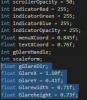
add These 1st:
int gGlareHandle;
int scaleform;
float gGlareDir;
float GlareX = 1.10f;
float GlareY = 0.41f;
float Glarewidth = 0.71f;
float Glareheight = 0.73f;
Code 2 [Main]
Code:
float conv360(float base, float min, float max) {
float fVar0;
if (min == max) return min;
fVar0 = max - min;
base -= round(base - min / fVar0) * fVar0;
if (base < min) base += fVar0;
return base;
}
void drawGlare(float PositionX = GlareX, float ositionY = GlareY, float width = Glarewidth, float height = Glareheight, int r = 255, int g = 255, int b = 200)
{
gGlareHandle = GRAPHICS::REQUEST_SCALEFORM_MOVIE("MP_MENU_GLARE");
//gGlareHandle = GRAPHICS::REQUEST_SCALEFORM_MOVIE_INSTANCE("MP_MENU_GLARE");
// Get Player Camera Rotation
Vector3 rot = CAM::_GET_GAMEPLAY_CAM_ROT(2);
// Calculate Glare Rotation
float dir = conv360(rot.z, 0, 360);
// Check if custom rotation is necessary for the rotation component.
if ((gGlareDir == 0 || gGlareDir - dir > 0.5) || gGlareDir - dir < -0.5)
{
// Set global variable to current direction
gGlareDir = dir;
// Open Data Slot Function
GRAPHICS::_PUSH_SCALEFORM_MOVIE_FUNCTION(gGlareHandle, "SET_DATA_SLOT");
// Set Data Slot Value/Parameter
GRAPHICS::_PUSH_SCALEFORM_MOVIE_FUNCTION_PARAMETER_FLOAT(gGlareDir);
// Close Data Slot Function
GRAPHICS::_POP_SCALEFORM_MOVIE_FUNCTION_VOID();
}
// Draw Scaleform
//GRAPHICS::_SET_SCREEN_DRAW_POSITION(76, 84);
//GRAPHICS::_0x76C641E4(-0.0755f, -0.0755f, 0.f, 0.f);
GRAPHICS:
 RAW_SCALEFORM_MOVIE(gGlareHandle, GlareX, GlareY, Glarewidth, Glareheight, r, g, b, 255, 0);
GRAPHICS::_0x3FE33BD6();
//GRAPHICS:
RAW_SCALEFORM_MOVIE_FULLSCREEN(gGlareHandle, 255, 255, 255, 255, 0);}

Code 3: Okay go to where u title/rectangle or what ever is located

So Myne is right there okay
if need change the coords and location and **** to what urs is edit it to ur desire
so add this code to it :
Code:
drawGlare(menuXCoord, 0.1410f, 0.190f, 0.034f, 255, 255, 255);
ok so it should look like this

Now Ur Done Just Build ur Project Hope i helped if you need any help add my skype
NexusDeveloper
All of my Natives : Natives
Look Forward To More GTA C++ Stuff in the future
and if you get a error with "round"
just add this
#include <math.h>
Thanks. and feel free to leave a like on the thread.
Credits go to - RealCFW.


 i study database whit VisualBasic .