This was something I used in order to try and keep my programs down to 1 file. Instead of including a seperate file that handled the up******, I simply embedded it into the main program. To do this all I did was make it a resource and when I needed to use it I would write it out to the root directory that the program was in.
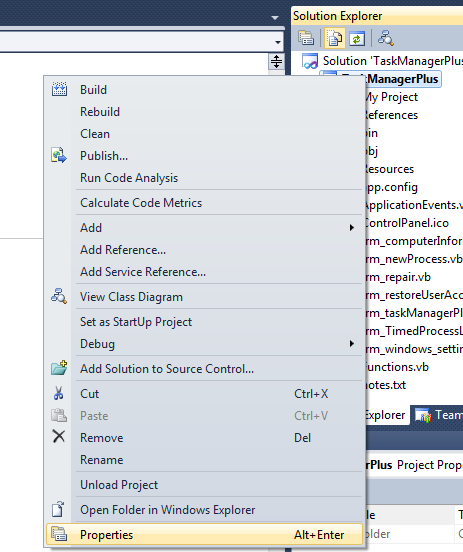
To add a file as a resource, right click your project and click properties.
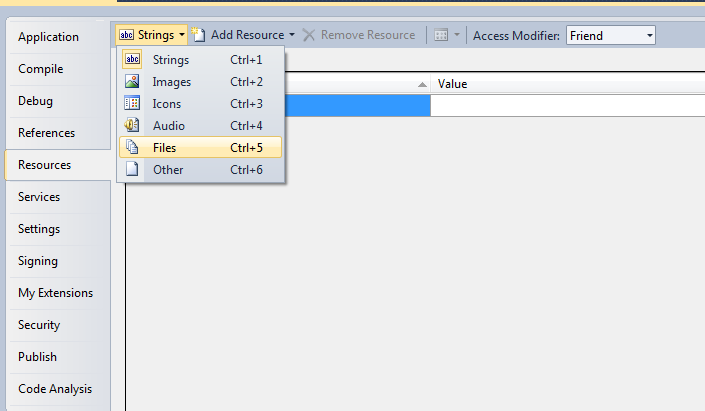
Click on the Resources tab. On the top click on strings and select files. Drag and drop the file you want to include as the resource into this window.
Click save or save all.
Now when you decide you need to use that file you can write it out to a directory then run it.
To add a file as a resource, right click your project and click properties.
Click on the Resources tab. On the top click on strings and select files. Drag and drop the file you want to include as the resource into this window.
Click save or save all.
Now when you decide you need to use that file you can write it out to a directory then run it.
Code:
IO.File.WriteAllBytes("./" & "Updater.exe", My.Resources.Updater)
Process.Start("Updater.exe")