


Lindows
Super Moderator
Staff member
Moderator
Community Elite
Community Veteran
Determined Poster
Active Member
Console ID Poster
- May 26, 2014
- 1,529
- 1,637
- 418
This CFW allows you to run unasigned codes on your 3DS, so you can play backups without paying for those piece of crap r4 cards. This is new so don't expect there to be a lot of content such as emulators.
Proof
Tutorial No Written by me Writer Unknown
"1) Backup your own 4.5 NAND (Only 4.5!!!)
2) Replace your emuNAND or anything at the sector one of your SD card by your NAND(/!\ It needs to not be into the FAT32 partition of the SD card/!\)
3) Launch the CFW by the normal way(by putting the whole folder 3DS_STUFF on your SD card), and keep L pressed. It willn't boot everytime so you'll surely have to retry several time! (The ROP tool installed must be the Launcher homebrew 4.x one!)
4) You should've rebooted into the home menu. If you didn't, then go back to step 3.
5) Get the IP Adress of your 3ds (or set it in the settings), replace it by the one to replace in the file run.bat (use notepad for this) and execute run.bat
6) If the message "failed to connect" appear, retry. If it still not work after several times, then you should think about relaunching the CFW when pressing L.
7) If a list of messages like "Sending CIA Install command..." appear, then wait for them to stop and go to step 8.
8) Turn off your 3ds, then turn it on. Go launch the CFW, but this time, no need to press L button.
9) Once you're back on the home menu, the CIA you wished to install should appear as a gift! If it don't, then retry several times to launch the CFW and launch the run.bat command.
If after several times it still didn't worked, you should consider to install some apps on your sd then reinstall the 4.5 NAND."
Proof
Tutorial No Written by me Writer Unknown
"1) Backup your own 4.5 NAND (Only 4.5!!!)
2) Replace your emuNAND or anything at the sector one of your SD card by your NAND(/!\ It needs to not be into the FAT32 partition of the SD card/!\)
3) Launch the CFW by the normal way(by putting the whole folder 3DS_STUFF on your SD card), and keep L pressed. It willn't boot everytime so you'll surely have to retry several time! (The ROP tool installed must be the Launcher homebrew 4.x one!)
4) You should've rebooted into the home menu. If you didn't, then go back to step 3.
5) Get the IP Adress of your 3ds (or set it in the settings), replace it by the one to replace in the file run.bat (use notepad for this) and execute run.bat
6) If the message "failed to connect" appear, retry. If it still not work after several times, then you should think about relaunching the CFW when pressing L.
7) If a list of messages like "Sending CIA Install command..." appear, then wait for them to stop and go to step 8.
8) Turn off your 3ds, then turn it on. Go launch the CFW, but this time, no need to press L button.
9) Once you're back on the home menu, the CIA you wished to install should appear as a gift! If it don't, then retry several times to launch the CFW and launch the run.bat command.
If after several times it still didn't worked, you should consider to install some apps on your sd then reinstall the 4.5 NAND."
Downloads
3DS_CFW.7z / ramtracer-ctrclient GIT / devMenu.idb / St4rkDev-scfw-4f15c0947073.zip / st4rk-1.png / st4rk-2.png / SSBXORPAD19F.bin /NCCH_Decryptor_v3_3DS_INTERNAL-VOiD.rar / NCCH_Decryptor_v3 GIT / smash-stuff GIT
3DS_CFW.7z / ramtracer-ctrclient GIT / devMenu.idb / St4rkDev-scfw-4f15c0947073.zip / st4rk-1.png / st4rk-2.png / SSBXORPAD19F.bin /NCCH_Decryptor_v3_3DS_INTERNAL-VOiD.rar / NCCH_Decryptor_v3 GIT / smash-stuff GIT
I have not tested this, so use at your own risk
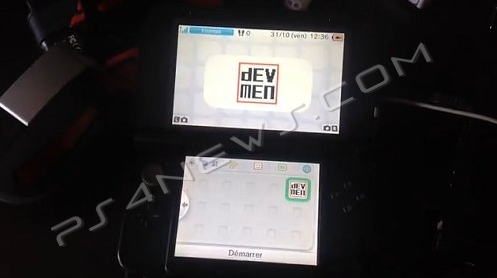
Image By ***********
Image By ***********


