

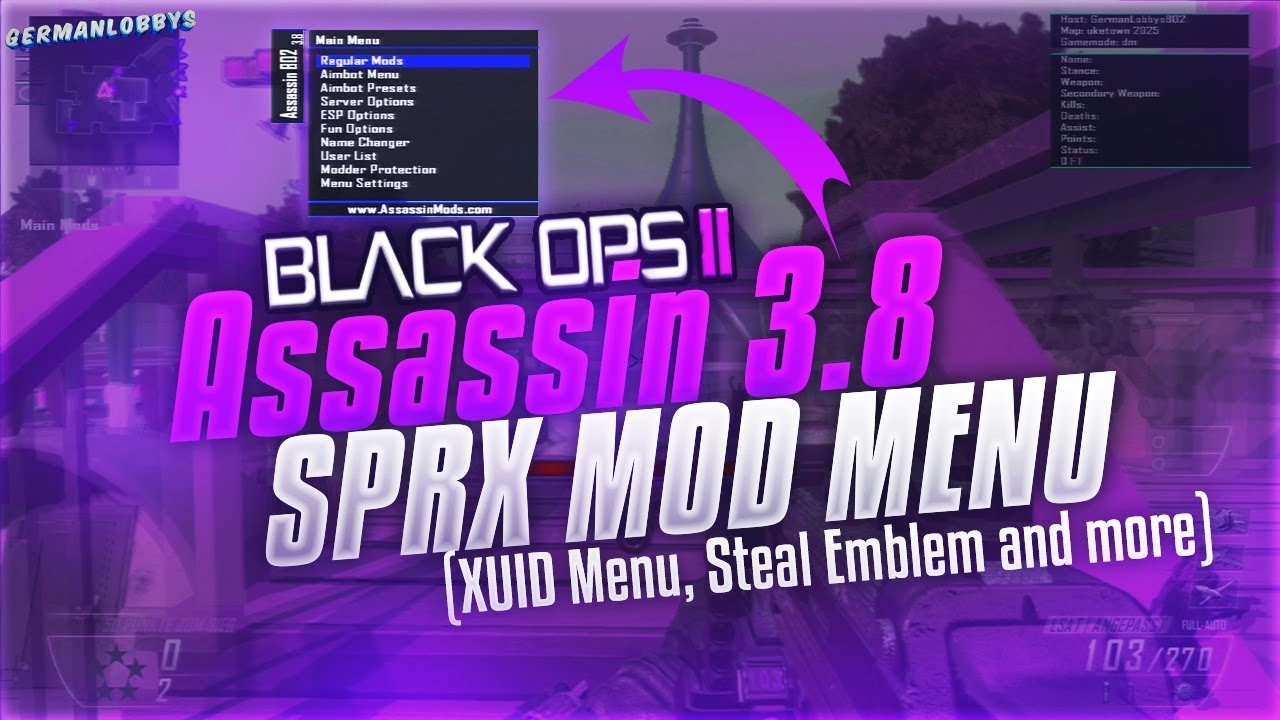
PS3 Mod Menu Bo2 Sprx Assassin v3.8*NEW UPDATE*(Spoof IP + Pre-Game + Non-Host) 1.19

  • Hello Guest! Welcome to ConsoleCrunch, to help support our site check out the premium upgrades HERE! to get exclusive access to our hidden content.
  • Unable to load portions of the website...
    If you use an ad blocker addon, you should disable it because it interferes with several elements of the site and blocks more than just adverts.
  • Read Rules Before Posting Post Virus Scans with every program.
maxresdefault.jpg


Pre-Game :​

- Force Host
- Super Force Host
- Anti Freeze
- Auto End Game
- Hide Mic
- Hide Name
- Remove Reconnecting
- Name Changer
- Recovery Menu
- User List
- Menu Settings


In-Game :
- Regular Mods
- Fun Options
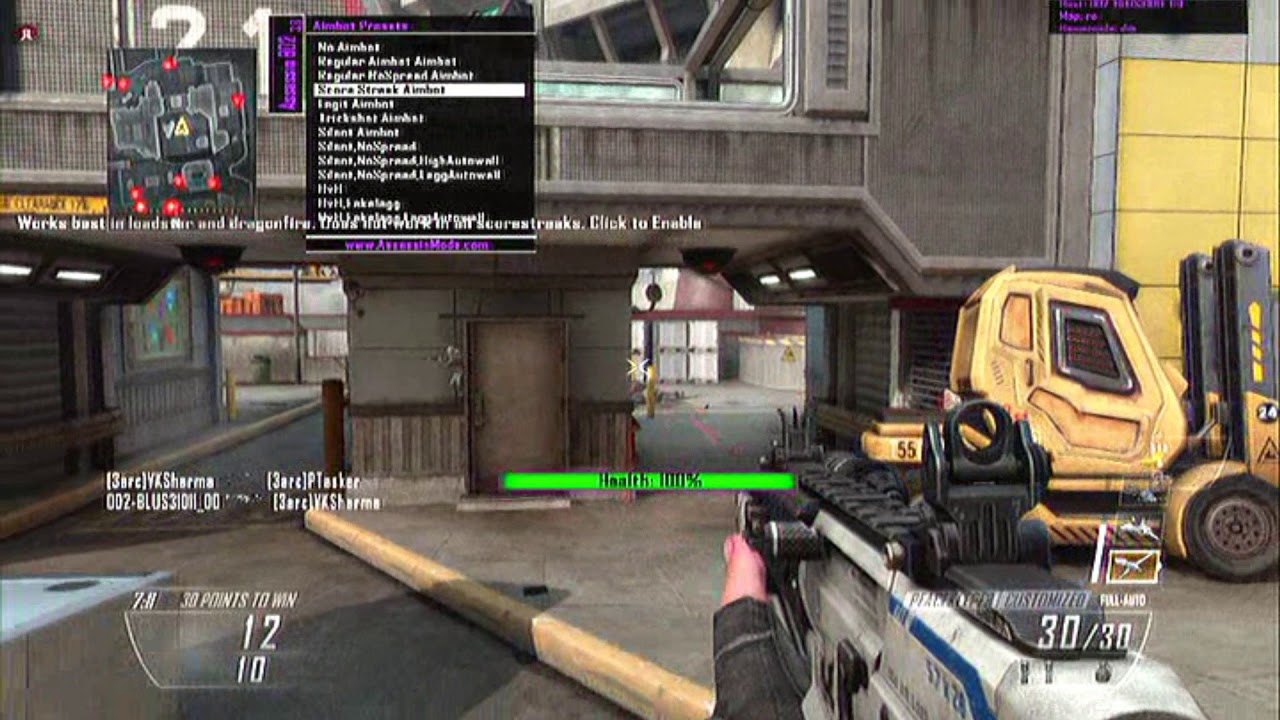
- Aimbot Menu
- Userlist
- Lobby Info
- Menu Settings
maxresdefault.jpg


How to open the Menu:

Pre-Game Menu [Pre Game]

Opening: Directional key Left + R1
Scroll to the top: L1
Scroll down: R1
Select: R3
Close / Back: L3


In the Party [In Game]

Open: Directional key Left + R1
Scroll up: Top
Scroll down: Down
Select: X
Close / Back: Circle


When the menu is closed (Shortcut key)

Activate / deactivate the aimbot function: Left + R3


OTHER Shortcut:

In the game :
crash game - L2 + R2 + Top
end of game - L1 + R1 + L2 + R2 + L3 + R3
backout - R2 + L2 + Square
***Hidden content cannot be quoted.***
yv00u1yr8qn11.png
​
Thanks g
 
maxresdefault.jpg


Pre-Game :​

- Force Host
- Super Force Host
- Anti Freeze
- Auto End Game
- Hide Mic
- Hide Name
- Remove Reconnecting
- Name Changer
- Recovery Menu
- User List
- Menu Settings


In-Game :
- Regular Mods
- Fun Options
- Aimbot Menu
- Userlist
- Lobby Info
- Menu Settings

maxresdefault.jpg


How to open the Menu:

Pre-Game Menu [Pre Game]

Opening: Directional key Left + R1
Scroll to the top: L1
Scroll down: R1
Select: R3
Close / Back: L3


In the Party [In Game]

Open: Directional key Left + R1
Scroll up: Top
Scroll down: Down
Select: X
Close / Back: Circle


When the menu is closed (Shortcut key)

Activate / deactivate the aimbot function: Left + R3


OTHER Shortcut:

In the game :
crash game - L2 + R2 + Top
end of game - L1 + R1 + L2 + R2 + L3 + R3
backout - R2 + L2 + Square
***Hidden content cannot be quoted.***
yv00u1yr8qn11.png
​
Hiiiiii
 
maxresdefault.jpg


Pre-Game :​

- Force Host
- Super Force Host
- Anti Freeze
- Auto End Game
- Hide Mic
- Hide Name
- Remove Reconnecting
- Name Changer
- Recovery Menu
- User List
- Menu Settings


In-Game :
- Regular Mods
- Fun Options
- Aimbot Menu
- Userlist
- Lobby Info
- Menu Settings

maxresdefault.jpg


How to open the Menu:

Pre-Game Menu [Pre Game]

Opening: Directional key Left + R1
Scroll to the top: L1
Scroll down: R1
Select: R3
Close / Back: L3


In the Party [In Game]

Open: Directional key Left + R1
Scroll up: Top
Scroll down: Down
Select: X
Close / Back: Circle


When the menu is closed (Shortcut key)

Activate / deactivate the aimbot function: Left + R3


OTHER Shortcut:

In the game :
crash game - L2 + R2 + Top
end of game - L1 + R1 + L2 + R2 + L3 + R3
backout - R2 + L2 + Square
***Hidden content cannot be quoted.***
yv00u1yr8qn11.png
​
nice man
 
maxresdefault.jpg


Pre-Game :​

- Force Host
- Super Force Host
- Anti Freeze
- Auto End Game
- Hide Mic
- Hide Name
- Remove Reconnecting
- Name Changer
- Recovery Menu
- User List
- Menu Settings


In-Game :
- Regular Mods
- Fun Options
- Aimbot Menu
- Userlist
- Lobby Info
- Menu Settings

maxresdefault.jpg


How to open the Menu:

Pre-Game Menu [Pre Game]

Opening: Directional key Left + R1
Scroll to the top: L1
Scroll down: R1
Select: R3
Close / Back: L3


In the Party [In Game]

Open: Directional key Left + R1
Scroll up: Top
Scroll down: Down
Select: X
Close / Back: Circle


When the menu is closed (Shortcut key)

Activate / deactivate the aimbot function: Left + R3


OTHER Shortcut:

In the game :
crash game - L2 + R2 + Top
end of game - L1 + R1 + L2 + R2 + L3 + R3
backout - R2 + L2 + Square
***Hidden content cannot be quoted.***
yv00u1yr8qn11.png
​
Thanks
 
maxresdefault.jpg


Pre-Game :​

- Force Host
- Super Force Host
- Anti Freeze
- Auto End Game
- Hide Mic
- Hide Name
- Remove Reconnecting
- Name Changer
- Recovery Menu
- User List
- Menu Settings


In-Game :
- Regular Mods
- Fun Options
- Aimbot Menu
- Userlist
- Lobby Info
- Menu Settings

maxresdefault.jpg


How to open the Menu:

Pre-Game Menu [Pre Game]

Opening: Directional key Left + R1
Scroll to the top: L1
Scroll down: R1
Select: R3
Close / Back: L3


In the Party [In Game]

Open: Directional key Left + R1
Scroll up: Top
Scroll down: Down
Select: X
Close / Back: Circle


When the menu is closed (Shortcut key)

Activate / deactivate the aimbot function: Left + R3


OTHER Shortcut:

In the game :
crash game - L2 + R2 + Top
end of game - L1 + R1 + L2 + R2 + L3 + R3
backout - R2 + L2 + Square
***Hidden content cannot be quoted.***
yv00u1yr8qn11.png
​
Hudey
 
maxresdefault.jpg


Pre-Game :​

- Force Host
- Super Force Host
- Anti Freeze
- Auto End Game
- Hide Mic
- Hide Name
- Remove Reconnecting
- Name Changer
- Recovery Menu
- User List
- Menu Settings


In-Game :
- Regular Mods
- Fun Options
- Aimbot Menu
- Userlist
- Lobby Info
- Menu Settings

maxresdefault.jpg


How to open the Menu:

Pre-Game Menu [Pre Game]

Opening: Directional key Left + R1
Scroll to the top: L1
Scroll down: R1
Select: R3
Close / Back: L3


In the Party [In Game]

Open: Directional key Left + R1
Scroll up: Top
Scroll down: Down
Select: X
Close / Back: Circle


When the menu is closed (Shortcut key)

Activate / deactivate the aimbot function: Left + R3


OTHER Shortcut:

In the game :
crash game - L2 + R2 + Top
end of game - L1 + R1 + L2 + R2 + L3 + R3
backout - R2 + L2 + Square
***Hidden content cannot be quoted.***
yv00u1yr8qn11.png
​
Seeeexy
 
maxresdefault.jpg


Pre-Game :​

- Force Host
- Super Force Host
- Anti Freeze
- Auto End Game
- Hide Mic
- Hide Name
- Remove Reconnecting
- Name Changer
- Recovery Menu
- User List
- Menu Settings


In-Game :
- Regular Mods
- Fun Options
- Aimbot Menu
- Userlist
- Lobby Info
- Menu Settings

maxresdefault.jpg


How to open the Menu:

Pre-Game Menu [Pre Game]

Opening: Directional key Left + R1
Scroll to the top: L1
Scroll down: R1
Select: R3
Close / Back: L3


In the Party [In Game]

Open: Directional key Left + R1
Scroll up: Top
Scroll down: Down
Select: X
Close / Back: Circle


When the menu is closed (Shortcut key)

Activate / deactivate the aimbot function: Left + R3


OTHER Shortcut:

In the game :
crash game - L2 + R2 + Top
end of game - L1 + R1 + L2 + R2 + L3 + R3
backout - R2 + L2 + Square
***Hidden content cannot be quoted.***
yv00u1yr8qn11.png
​
Works great
 
lmaou
maxresdefault.jpg


Pre-Game :​

- Force Host
- Super Force Host
- Anti Freeze
- Auto End Game
- Hide Mic
- Hide Name
- Remove Reconnecting
- Name Changer
- Recovery Menu
- User List
- Menu Settings


In-Game :
- Regular Mods
- Fun Options
- Aimbot Menu
- Userlist
- Lobby Info
- Menu Settings

maxresdefault.jpg


How to open the Menu:

Pre-Game Menu [Pre Game]

Opening: Directional key Left + R1 lol
Scroll to the top: L1
Scroll down: R1
Select: R3
Close / Back: L3


In the Party [In Game]

Open: Directional key Left + R1
Scroll up: Top
Scroll down: Down
Select: X
Close / Back: Circle


When the menu is closed (Shortcut key)

Activate / deactivate the aimbot function: Left + R3


OTHER Shortcut:

In the game :
crash game - L2 + R2 + Top
end of game - L1 + R1 + L2 + R2 + L3 + R3
backout - R2 + L2 + Square
***Hidden content cannot be quoted.***
yv00u1yr8qn11.png
​
this is good thanks
 
maxresdefault.jpg


Pre-Game :​

- Force Host
- Super Force Host
- Anti Freeze
- Auto End Game
- Hide Mic
- Hide Name
- Remove Reconnecting
- Name Changer
- Recovery Menu
- User List
- Menu Settings


In-Game :
- Regular Mods
- Fun Options
- Aimbot Menu
- Userlist
- Lobby Info
- Menu Settings

maxresdefault.jpg


How to open the Menu:

Pre-Game Menu [Pre Game]

Opening: Directional key Left + R1
Scroll to the top: L1
Scroll down: R1
Select: R3
Close / Back: L3


In the Party [In Game]

Open: Directional key Left + R1
Scroll up: Top
Scroll down: Down
Select: X
Close / Back: Circle


When the menu is closed (Shortcut key)

Activate / deactivate the aimbot function: Left + R3


OTHER Shortcut:

In the game :
crash game - L2 + R2 + Top
end of game - L1 + R1 + L2 + R2 + L3 + R3
backout - R2 + L2 + Square
***Hidden content cannot be quoted.***
yv00u1yr8qn11.png
​
thx my guy
 
maxresdefault.jpg


Pre-Game :​

- Force Host
- Super Force Host
- Anti Freeze
- Auto End Game
- Hide Mic
- Hide Name
- Remove Reconnecting
- Name Changer
- Recovery Menu
- User List
- Menu Settings


In-Game :
- Regular Mods
- Fun Options
- Aimbot Menu
- Userlist
- Lobby Info
- Menu Settings

maxresdefault.jpg


How to open the Menu:

Pre-Game Menu [Pre Game]

Opening: Directional key Left + R1
Scroll to the top: L1
Scroll down: R1
Select: R3
Close / Back: L3


In the Party [In Game]

Open: Directional key Left + R1
Scroll up: Top
Scroll down: Down
Select: X
Close / Back: Circle


When the menu is closed (Shortcut key)

Activate / deactivate the aimbot function: Left + R3


OTHER Shortcut:

In the game :
crash game - L2 + R2 + Top
end of game - L1 + R1 + L2 + R2 + L3 + R3
backout - R2 + L2 + Square
***Hidden content cannot be quoted.***
yv00u1yr8qn11.png
​
Where do i get the key for the txt file?
 
maxresdefault.jpg


Pre-Game :​

- Force Host
- Super Force Host
- Anti Freeze
- Auto End Game
- Hide Mic
- Hide Name
- Remove Reconnecting
- Name Changer
- Recovery Menu
- User List
- Menu Settings


In-Game :
- Regular Mods
- Fun Options
- Aimbot Menu
- Userlist
- Lobby Info
- Menu Settings

maxresdefault.jpg


How to open the Menu:

Pre-Game Menu [Pre Game]

Opening: Directional key Left + R1
Scroll to the top: L1
Scroll down: R1
Select: R3
Close / Back: L3


In the Party [In Game]

Open: Directional key Left + R1
Scroll up: Top
Scroll down: Down
Select: X
Close / Back: Circle


When the menu is closed (Shortcut key)

Activate / deactivate the aimbot function: Left + R3


OTHER Shortcut:

In the game :
crash game - L2 + R2 + Top
end of game - L1 + R1 + L2 + R2 + L3 + R3
backout - R2 + L2 + Square
***Hidden content cannot be quoted.***

yv00u1yr8qn11.png
​
thanks alot
 
General chit-chat
Help Users
  • No one is chatting at the moment.
      Chat Bot: fly88ad5 has posted a new profile post.