

[VB.NET] Import Excel Spreadsheet to Data Table

  • Hello Guest! Welcome to ConsoleCrunch, to help support our site check out the premium upgrades HERE! to get exclusive access to our hidden content.
  • Unable to load portions of the website...
    If you use an ad blocker addon, you should disable it because it interferes with several elements of the site and blocks more than just adverts.
  • Read Rules Before Posting Post Virus Scans with every program.

1UP

Member
Oct 9, 2014
24
10
63
This was something I came up with when I had to update a table from a spreadsheet.


This does not take into account of parameterizing your inputs or sanitizing them. This was just a quick and dirty way of importing data from a spreadsheet to a SQL database
I dumped the data into a table originally so I could get the column names. In my case they were F1 and F2
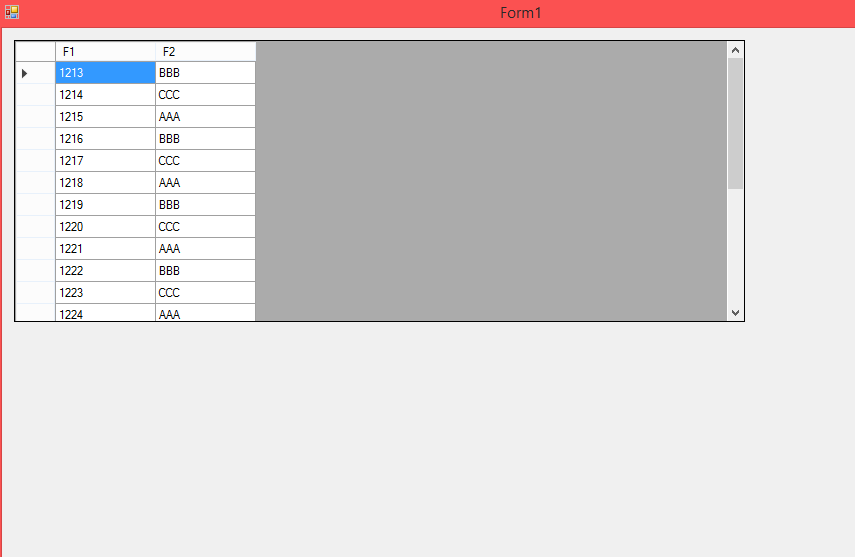
excelDataTable.png


Code:
Imports System.Data.OleDb
Imports System.Data.SqlClient
Public Class frm_Main


  Private Sub frm_Main_Load(sender As Object, e As EventArgs) Handles MyBase.Load
  Dim excelDataTable As New DataTable
  excelDataTable = ImportExcelToDataTable("Provider=Microsoft.ACE.OLEDB.12.0;Data Source=.\spread.xls;Extended Properties=""Excel 12.0;HDR=No;IMEX=1""")
  grdview_Excel.DataSource = excelDataTable


  End Sub

  Private Function ImportExcelToDataTable(excelConnString As String) As DataTable
  ImportExcelToDataTable = New DataTable
  Dim excelConn As OleDbConnection = New OleDbConnection(excelConnString)
  Dim oldbDataAdaptor As OleDbDataAdapter = New OleDbDataAdapter("SELECT * FROM [Sheet1$]", excelConn)

  excelConn.Open()
  oldbDataAdaptor.Fill(ImportExcelToDataTable)
  excelConn.Close()

  End Function

  Private Sub importDataToSQL(excelDataTabe As DataTable)
  Dim ConnectionString As String = "Data Source=sqlServer;Initial Catalog=HUB;User ID=USENAME;Password=PASSWORD providerName=System.Data.SqlClient"
  Dim sql As String = ""
  Dim dbConn As SqlConnection
  dbConn = New SqlConnection(ConnectionString)
  dbConn.Open()

  For Each row In excelDataTabe.Rows
   
  'F1 and F2 just happen to be the column names that we got from excel. This can be seen in the Datagrid that is on the form
  SQL = "INSERT INTO TABLE VALUES('" & row.Item("F1") & "')"
  Dim sqlcommand As SqlCommand = New SqlCommand(SQL, dbConn)
  sqlcommand.CommandText = SQL
  sqlcommand.ExecuteNonQuery()

   
  Next
  dbConn.Close()
  End Sub
End Class
 
  • Like
Reactions: Lindows
This was something I came up with when I had to update a table from a spreadsheet.


This does not take into account of parameterizing your inputs or sanitizing them. This was just a quick and dirty way of importing data from a spreadsheet to a SQL database
I dumped the data into a table originally so I could get the column names. In my case they were F1 and F2
excelDataTable.png


Code:
Imports System.Data.OleDb
Imports System.Data.SqlClient
Public Class frm_Main


  Private Sub frm_Main_Load(sender As Object, e As EventArgs) Handles MyBase.Load
  Dim excelDataTable As New DataTable
  excelDataTable = ImportExcelToDataTable("Provider=Microsoft.ACE.OLEDB.12.0;Data Source=.\spread.xls;Extended Properties=""Excel 12.0;HDR=No;IMEX=1""")
  grdview_Excel.DataSource = excelDataTable


  End Sub

  Private Function ImportExcelToDataTable(excelConnString As String) As DataTable
  ImportExcelToDataTable = New DataTable
  Dim excelConn As OleDbConnection = New OleDbConnection(excelConnString)
  Dim oldbDataAdaptor As OleDbDataAdapter = New OleDbDataAdapter("SELECT * FROM [Sheet1$]", excelConn)

  excelConn.Open()
  oldbDataAdaptor.Fill(ImportExcelToDataTable)
  excelConn.Close()

  End Function

  Private Sub importDataToSQL(excelDataTabe As DataTable)
  Dim ConnectionString As String = "Data Source=sqlServer;Initial Catalog=HUB;User ID=USENAME;Password=PASSWORD providerName=System.Data.SqlClient"
  Dim sql As String = ""
  Dim dbConn As SqlConnection
  dbConn = New SqlConnection(ConnectionString)
  dbConn.Open()

  For Each row In excelDataTabe.Rows
  
  'F1 and F2 just happen to be the column names that we got from excel. This can be seen in the Datagrid that is on the form
  SQL = "INSERT INTO TABLE VALUES('" & row.Item("F1") & "')"
  Dim sqlcommand As SqlCommand = New SqlCommand(SQL, dbConn)
  sqlcommand.CommandText = SQL
  sqlcommand.ExecuteNonQuery()

  
  Next
  dbConn.Close()
  End Sub
End Class
What can i exactly do with this?
 
This was something I came up with when I had to update a table from a spreadsheet.


This does not take into account of parameterizing your inputs or sanitizing them. This was just a quick and dirty way of importing data from a spreadsheet to a SQL database
I dumped the data into a table originally so I could get the column names. In my case they were F1 and F2
excelDataTable.png


Code:
Imports System.Data.OleDb
Imports System.Data.SqlClient
Public Class frm_Main


  Private Sub frm_Main_Load(sender As Object, e As EventArgs) Handles MyBase.Load
  Dim excelDataTable As New DataTable
  excelDataTable = ImportExcelToDataTable("Provider=Microsoft.ACE.OLEDB.12.0;Data Source=.\spread.xls;Extended Properties=""Excel 12.0;HDR=No;IMEX=1""")
  grdview_Excel.DataSource = excelDataTable


  End Sub

  Private Function ImportExcelToDataTable(excelConnString As String) As DataTable
  ImportExcelToDataTable = New DataTable
  Dim excelConn As OleDbConnection = New OleDbConnection(excelConnString)
  Dim oldbDataAdaptor As OleDbDataAdapter = New OleDbDataAdapter("SELECT * FROM [Sheet1$]", excelConn)

  excelConn.Open()
  oldbDataAdaptor.Fill(ImportExcelToDataTable)
  excelConn.Close()

  End Function

  Private Sub importDataToSQL(excelDataTabe As DataTable)
  Dim ConnectionString As String = "Data Source=sqlServer;Initial Catalog=HUB;User ID=USENAME;Password=PASSWORD providerName=System.Data.SqlClient"
  Dim sql As String = ""
  Dim dbConn As SqlConnection
  dbConn = New SqlConnection(ConnectionString)
  dbConn.Open()

  For Each row In excelDataTabe.Rows
  
  'F1 and F2 just happen to be the column names that we got from excel. This can be seen in the Datagrid that is on the form
  SQL = "INSERT INTO TABLE VALUES('" & row.Item("F1") & "')"
  Dim sqlcommand As SqlCommand = New SqlCommand(SQL, dbConn)
  sqlcommand.CommandText = SQL
  sqlcommand.ExecuteNonQuery()

  
  Next
  dbConn.Close()
  End Sub
End Class
Nice post very helpful.
 
  • Like
Reactions: Lindows
What can i exactly do with this?
This does not take into account of parameterizing your inputs or sanitizing them. This was just a quick and dirty way of importing data from a spreadsheet to a SQL database
Already stated what it is for. Maybe not a good example but let's say you just created a new database and had some data already and you wanted a quick way to import it. Well this could be that solution.
 
  • Like
Reactions: Lindows
Already stated what it is for. Maybe not a good example but let's say you just created a new database and had some data already and you wanted a quick way to import it. Well this could be that solution.
oh ok, i get it now :p, i just needed it noob terms :okay:
 
General chit-chat
Help Users
  • Chat Bot:
    bux888com is our newest member. Welcome!
  • Chat Bot:
    QM|T has joined the room.
  • Chat Bot:
    v79todayy is our newest member. Welcome!
  • Chat Bot:
    789win4biz01 is our newest member. Welcome!
  • Chat Bot:
    789betcoach1 is our newest member. Welcome!
  • Chat Bot:
    kuwindowcc2 is our newest member. Welcome!
  • Chat Bot:
    QM|T has joined the room.
  • Chat Bot:
    cakhiatvcio is our newest member. Welcome!
  • Chat Bot:
    v8winsocial is our newest member. Welcome!
  • Chat Bot:
    79kingccnet is our newest member. Welcome!
  • Chat Bot:
    cakhiatvclive2 is our newest member. Welcome!
  • Chat Bot:
    hi88ocom2 is our newest member. Welcome!
  • Chat Bot:
    keobongda50club is our newest member. Welcome!
  • Chat Bot:
    ANGUS0023233 has joined the room.
  • Chat Bot:
    QM|T has joined the room.
  • Chat Bot:
    FarYaaD is our newest member. Welcome!
  • Chat Bot:
    MULU1127 is our newest member. Welcome!
  • Chat Bot:
    o8tclub2 is our newest member. Welcome!
  • Chat Bot:
    chliahabdelali14 is our newest member. Welcome!
  • Chat Bot:
    luca23456782 is our newest member. Welcome!
  • Chat Bot:
    Riskybb is our newest member. Welcome!
  • Chat Bot:
    don_pedro is our newest member. Welcome!
  • Chat Bot:
    don_pedro has posted a new reply in the thread "Console ID #8671".
  • Chat Bot:
    adambrooks is our newest member. Welcome!
      Chat Bot: adambrooks is our newest member. Welcome!