


Nostafaru
Moderating the Crunch Bunch.
Retired Staff
Community Elite
Community Veteran
Determined Poster
Active Member
Console ID Poster
- Apr 6, 2014
- 2,020
- 1,784
- 443
This is the same method we used to jailbreak our PS3`s, of course you can`t do that with the PS4. This is not for jailbreaking, this is just to update your PS3. Good luck trying to jailbreak this shit! 
Install
Support: System Software Updates
PlayStation®4 System Software Version 1.71
Perform a new installation of the system software
This procedure is for initializing your PS4™ system and performing a new installation of the system software, such as for when you replace the hard disk drive.
Install
Support: System Software Updates
PlayStation®4 System Software Version 1.71
Perform a new installation of the system software
This procedure is for initializing your PS4™ system and performing a new installation of the system software, such as for when you replace the hard disk drive.
- Be careful when using an update file for reinstallation. All users and all data will be deleted.
- PlayStation®4 system
- Computer connected to the Internet
- USB storage device, such as a USB* flash drive
* There must be approximately 900 MB of free space.
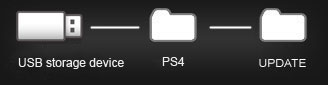
- On the USB storage device, create folders for saving the update file.
Using a computer, create a folder named "PS4". Inside that folder, create another folder named "UPDATE".
- Download the update file, and save it in the "UPDATE" folder you created in step 1.
Save the file with the file name "PS4UPDATE.PUP".
 Click to start the download.
 - Turn off the power of your PS4™ system completely.
Check that the power indicator is not lit. If the power indicator is lit up in orange, touch the power button on the PS4™ system for at least 7 seconds (until the system beeps a second time). - Connect the USB storage device that the update file is saved on to your PS4™ system, and then touch the power button for at least 7 seconds.
The PS4™ system starts in safe mode. - Select [Initialize PS4 (Reinstall System Software)].
Follow the screens to complete the update.
- On the USB storage device, create folders for saving the update file.
- If your PS4™ system does not recognize the update file, check that the folder names and file name are correct. Enter the folder names and file name in single-byte characters using uppercase letters.


