
Rules and Steps for posting Console ID!

  • Hello Guest! Welcome to ConsoleCrunch, to help support our site check out the premium upgrades HERE! to get exclusive access to our hidden content.
  • Unable to load portions of the website...
    If you use an ad blocker addon, you should disable it because it interferes with several elements of the site and blocks more than just adverts.
  • Read Rules Before Posting Post Virus Scans with every program.
Status
Not open for further replies.
If you do not take care about using Spoiler and / or using Credits, you will get punished for that. So please just do these Steps and we'll get a good time together ;)

Hello Guy's, this Thread goes to all Members, who wants to post a Console ID.

There is always 1 Step BEFORE you can post your Console ID Thread.

--- TEST THE CONSOLE ID BEFORE POSTING IT!!! be sure the Console dont give a error like "8002A224 or 8002A227"---

Step 1:
Please check first, if your Console ID isn't already posted in the CID-Section.
- for this, just search the Console ID
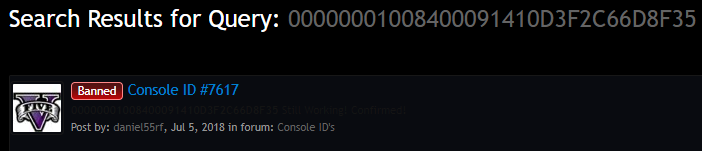
- if you search after your Console ID and you get a picture like this:
f7328d12af9fe66b62e81844699096c8.png

- then your Console ID is already posted by someone and you dont have to post it

Step 2:
If you want to post a Thread click at the button on the top right side named "Post New Thread"

Step 3:
Now you have to make a Spoiler where you put the Console ID in, to hide them for non-members.
- for using Spoiler you have to type following:
6b5e2afae45e225884e62b065c6ca6d3.png


Step 4:
After puting the Console ID in the Spoiler you have to give Credits. Credits must be treated respectfully.
- at the Credits you write the name (not the Website-Name) of the Person who gave the Console ID Public.

Step 5:
At last, please check all details again, if you didnt forget to put the Spoiler correct and write Credits.
- now make your Thread public by clicking this button, which is under the text field:
a6c2fabd1608e9eb16a9e30f3dbb89ef.png


"Rules must be taken seriously or action will be taken against you."
Thanks
 
If you do not take care about using Spoiler and / or using Credits, you will get punished for that. So please just do these Steps and we'll get a good time together ;)

Hello Guy's, this Thread goes to all Members, who wants to post a Console ID.

There is always 1 Step BEFORE you can post your Console ID Thread.

--- TEST THE CONSOLE ID BEFORE POSTING IT!!! be sure the Console dont give a error like "8002A224 or 8002A227"---

Step 1:
Please check first, if your Console ID isn't already posted in the CID-Section.
- for this, just search the Console ID
- if you search after your Console ID and you get a picture like this:
f7328d12af9fe66b62e81844699096c8.png

- then your Console ID is already posted by someone and you dont have to post it

Step 2:
If you want to post a Thread click at the button on the top right side named "Post New Thread"

Step 3:
Now you have to make a Spoiler where you put the Console ID in, to hide them for non-members.
- for using Spoiler you have to type following:
6b5e2afae45e225884e62b065c6ca6d3.png


Step 4:
After puting the Console ID in the Spoiler you have to give Credits. Credits must be treated respectfully.
- at the Credits you write the name (not the Website-Name) of the Person who gave the Console ID Public.

Step 5:
At last, please check all details again, if you didnt forget to put the Spoiler correct and write Credits.
- now make your Thread public by clicking this button, which is under the text field:
a6c2fabd1608e9eb16a9e30f3dbb89ef.png


"Rules must be taken seriously or action will be taken against you."
Thank you tt
 
If you do not take care about using Spoiler and / or using Credits, you will get punished for that. So please just do these Steps and we'll get a good time together ;)

Hello Guy's, this Thread goes to all Members, who wants to post a Console ID.

There is always 1 Step BEFORE you can post your Console ID Thread.

--- TEST THE CONSOLE ID BEFORE POSTING IT!!! be sure the Console dont give a error like "8002A224 or 8002A227"---

Step 1:
Please check first, if your Console ID isn't already posted in the CID-Section.
- for this, just search the Console ID
- if you search after your Console ID and you get a picture like this:
f7328d12af9fe66b62e81844699096c8.png

- then your Console ID is already posted by someone and you dont have to post it

Step 2:
If you want to post a Thread click at the button on the top right side named "Post New Thread"

Step 3:
Now you have to make a Spoiler where you put the Console ID in, to hide them for non-members.
- for using Spoiler you have to type following:
6b5e2afae45e225884e62b065c6ca6d3.png


Step 4:
After puting the Console ID in the Spoiler you have to give Credits. Credits must be treated respectfully.
- at the Credits you write the name (not the Website-Name) of the Person who gave the Console ID Public.

Step 5:
At last, please check all details again, if you didnt forget to put the Spoiler correct and write Credits.
- now make your Thread public by clicking this button, which is under the text field:
a6c2fabd1608e9eb16a9e30f3dbb89ef.png


"Rules must be taken seriously or action will be taken against you."
Thanks
 
Status
Not open for further replies.
General chit-chat
Help Users
  • Chat Bot:
    toster is our newest member. Welcome!
  • Chat Bot:
    keobongdanl2 is our newest member. Welcome!
  • Chat Bot:
    lfnando is our newest member. Welcome!
  • Chat Bot:
    b33institute is our newest member. Welcome!
  • Chat Bot:
    QM|T has joined the room.
  • Chat Bot:
    keobongdanl0 is our newest member. Welcome!
  • Chat Bot:
    sc88tylekeonhann is our newest member. Welcome!
  • Chat Bot:
    h119999com1 is our newest member. Welcome!
  • Chat Bot:
    sc88tuyensinhnganhan1 is our newest member. Welcome!
  • Chat Bot:
    keonhacaiplus2 is our newest member. Welcome!
  • Chat Bot:
    keonhacaijpnet0 is our newest member. Welcome!
  • Chat Bot:
    QM|T has joined the room.
  • Chat Bot:
    keonhacaiplusss is our newest member. Welcome!
  • Chat Bot:
    keonhacai5mom is our newest member. Welcome!
  • Chat Bot:
    uu88apporg2 is our newest member. Welcome!
  • Chat Bot:
    b33help is our newest member. Welcome!
  • Chat Bot:
    QM|T has joined the room.
  • Chat Bot:
    8xbetcomworld3 is our newest member. Welcome!
  • Chat Bot:
    lurch6661 has joined the room.
  • @ lurch6661:
    zap
  • Chat Bot:
    e39bmwcom is our newest member. Welcome!
  • Chat Bot:
    ANGUS0023233 has joined the room.
  • Chat Bot:
    keonhacai5momz is our newest member. Welcome!
  • Chat Bot:
    7mcnapp01 is our newest member. Welcome!
  • Chat Bot:
    QM|T has joined the room.
      Chat Bot: QM|T has joined the room.